This is my letter to anyone within the Sprint, HTC, and Android organizations who will listen to my plea for an actual quick and final solution to my phone problem…
✉
Hello,
I’m writing to inform you of a problem that I’ve had with Sprint customer service, HTC‘s hardware, and Android‘s operating system. I’m not sure what kind of answer or resolution I’m looking for. I just feel the need to tell someone or everyone how unacceptable Sprint’s service (or lack thereof) has been lately as related to multiple HTC or Android errors.
It started about two weeks ago, shortly after I applied the latest update as prompted by the phone. My original HTC EVO 4G LTE purchased only in September started going crazy. The screen would freeze, become slow or completely unresponsive. It would eventually load a screen that looked like TV static… only not moving. Naturally, I took it to the Sprint store. They also tried to blame the problem on various apps and settings. They did a soft rest, a hard reset, and even apparently looked up the problem on the internet. I had to leave my phone overnight and pick it up the next day. Well, the next day I was given a new or refurbished phone. The store employee said he couldn’t tell if it was new or refurbished. He said it might be new because the phone itself was rather new and they might not have refurbs yet. I find it hard to believe he couldn’t tell a new phone from a refurbished one.
So, after updating the new phone, reinstalling some apps, and setting everything up the way I had it on the old one… I started to notice a minor annoyance. If I opened a browser link through Facebook, email, or Twitter it would immediately close after it fully loaded. I took it to the Sprint store that Saturday morning. Again, they did the soft & hard resets, and tried to blame it on an App. They changed some settings in the phone that were telling the phone to look for a 4G network. When I went back in after leaving the store & running into the browser-closing problem again… The next guy changed that setting back and told me that I shouldn’t have changed it… and wouldn’t listen when I told him the last guy had just changed it. Oddly enough, I was told that the 4G network would be in the area by January when I purchased the 4G phone. When I told the person helping me at the Sprint store that I was told that… he says they were never given a timeline. Is lying part of your training as a Sprint customer service representative or sales person? What about intimidation and making someone feel like they’re not using their phone properly?
I was persuaded out of getting a 2nd replacement phone. I was told to delete all of my apps, add them back one by one to see which was causing the problem. The browser-closing problem was happening even without any added apps. Now it was shutting the phone off each time the browser crashed. I can assure you that I’m not an idiot when it comes to technology. I was told I was part of a percentage of HTC users that were having a similar problem, and that a replacement phone could potentially have the same issues… and to wait for HTC to make the next update. So, the solution was to wait?
My phone has taken to shutting itself off all week at random intervals. I can be talking on the phone, using Facebook, or not even be near the phone. It just shuts itself off. It comes back on, and I send HTC an error report. Where do these error reports go? Do they do any good? Is anyone working on the problem? Is this an HTC problem, or an Android problem?
Well, I waited a week. This Saturday I went back to the Sprint store, looking for a replacement phone. I work on the road & I have a pregnant wife. I need my phone to be functioning properly all the time. Again, we went through the hard reset option, and my apps were blamed. “Unfortunately Android is an open system” they said. “It must be a bug.” What about this mysterious problem that a certain percentage of HTC users had encountered? (I wish I could remember the percentage, I was told 10% or 20%, I believe.) A week has gone by with an apparently large bug issue, and nothing has been done about it?

All clean!
I was advised to install the Lookout app. I guess that app’s OK. I was told it would hunt out any apps that were messing up my phone. So, another thing to add to my monthly bill… Of course it’s not free or a one-time fee. As I tried to download & install Lookout, my phone shut itself off. I handed it to the woman assisting me, and it shut off for her again. She took it back to the technician. Again. Their advice was to run this app, and hope for the best.
Upon walking out of the store, I ran the app & it found no problems with any of my installed apps. I went back into the store, and this time they decided to put in a “ticket” for a replacement phone. I really have to wait again? A phone may be in by Tuesday. Again, I will have to re-download my apps, re-import my contacts, put all of my settings back. This will be the 5th time within the span of three weeks.
I left the store hoping to go on about my day, & my phone went into some “HD media link” video after hanging up on my wife in the middle of a conversation where I was expressing to her my exasperation with the entire situation. I went back to the store asking for the next level of solution. An entirely new phone? I’m not eligible for anything other than the ridiculously outrageous full prices because I’m not eligible for a new phone, or wouldn’t be singing up for a new line. I have been a Sprint customer for over 10 years. You would think that would carry some sort of weight. You would think I could “split the difference” in purchasing a new phone with some kind of discount. You would think a quick affordable solution would be offered instead of feigned apologies & being told to wait. I feel like I might as well have been talking to the brick wall in front of the store. It would have offered the same resolutions & peace of mind.
The early termination fees are the moral equivalent of extortion. I am tempted to move all five lines in our plan to another carrier. For what we pay for 5 lines total per month, you’d think Sprint would like to keep us happy. Once all the 2 year limits are up (and they’ll all be happening around the same time), we will be moving to another carrier. I know that Verizon has better signal/coverage in our area anyway.
I think that HTC and Android may find it interesting that Sprint employees routinely verbally (pardon the expression) shit all over the hardware, firmware, software & apps before any diagnosis is even made. Perhaps you ought to review your arrangements with how Sprint “supports” your products.
HTC ought to be a little more transparent as to where the error reports go… and maybe perhaps respond to them? Let someone know that you’re working on the issue. Maybe let Sprint or other carriers know if you’re having a major issue or if you get 10+ error reports from the same phone in one day.
If anyone can offer a solution or explanation that doesn’t throw another entity under the proverbial bus, I’d love to hear it. I just wanted to let everyone involved see how poorly their products & services are being represented. Writing this & eventually blogging it will hopefully be therapeutic. It’s an added bonus if it helps bring to light a seemingly never-ending careless customer service loop, and even better if it gets something resolved.
Thank you for your time in reading of my misadventures, I hope to hear your thoughts.
Disgruntled & disgusted,
-Eric
✉
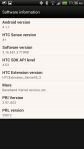
Some more phone info if you need it:
-

-
Error Report – Pg 1
-

-
Error Report – Pg 2
-
-
Phone Info

Sprint Fail (Photo credit: evo_terra)
















 World (and Lunar) Domination